

In the early days of the Web, very little data was encrypted in transit. Of what little was encrypted, only a subset was encrypted adequately. US export controls treated strong cryptographic software as a weapon, so web browsers shipped with weakened “export-grade” encryption. Those controls were relaxed around the turn of the millennium (during a past AI winter). Later efforts including the EFF’s HTTPS Everywhere and the free, automated certificates provided by Let’s Encrypt helped make HTTPS with reasonable ciphers the norm we have today.
One lasting effect of that history is that, for a certain population, “military-grade encryption” has a very precise connotation: It’s the actual encryption you can’t have, while the encryption you can have isn’t actually that good. It’s unsafe to let others have it. Or it’s too expensive to let you have it. The only way to stop a bad guy with a gun is for the other guys with guns to be able to read your email, or something like that. There is no alternative.
To rapidly bring this back to generative AI in higher education, I’m going to talk about who can see the data processed by LLMs. It might seem that if a language model needs to read your text to understand it, and a remote provider runs the model, then the provider needs to be able to read your text. I can require that it be encrypted on the way there and that the provider encrypt it when stored (or simply not store it at all). But surely the provider needs to be able to read it while the model is working? Nope! The model needs to to read it, but the model provider doesn’t.
It’s time for some military-grade encryption, of a sort.
Suppose you are the United States Department of War, and you need a good coding agent for, you know, war stuff. Do you just make a POST request to https://api.openai.com/v1 like any other customer? Probably not. I can’t find the precise details of how it all works. I got lost among FedRAMP, DISA, ESI, IL5 and IL6, why the Pentagon cleared AWS, Google, Microsoft, OpenAI, and others but not Anthropic, blah. Let’s work from basic words on public webpages, not acronyms and mysterious dead-end landing pages.
Our sister campus UC Riverside was proud to announce a partnership with Google to address “technical red tape and rigorous security and technical oversight that occasionally forced the university to decline critical funding.” The solution was a “secure enclave” with a “secure network boundary that keeps sensitive information such as Controlled Unclassified Information (CUI) protected.”
Here I hit an delightful name collision (or perhaps an aspirational declaration of intent). UCR’s Secure Enclave seems to be a tightly controlled, monitored Google Cloud environment built with Stellar Engine (an open-source Terraform framework for deploying infrastructure that maps onto federal security requirements). The enclosure is mostly administrative and architectural: identity controls, isolated networks, managed encryption keys, restricted ingress and egress, extensive logging, and a substantial pile of compliance documentation. Stellar Engine can also provision Confidential VMs, but UCR’s public documentation doesn’t say whether it uses them. More importantly, it describes authorized UCR staff managing the environment and its decryption keys. This kind of secure enclave controls which operators may see the data. It doesn’t necessarily mean operator access cryptographically impossible. Zero operator access (ZOA) is the specific property I’m itching for.
Meanwhile, Google sells something closer to another meaning of secure enclave. Confidential Space runs a workload inside a hardware-backed trusted execution environment (TEE). Remote attestation lets someone check which code is running before releasing secrets to it, while memory encryption and a hardened operating system keep the workload hidden even from the people operating the surrounding infrastructure (awesome!). Skipping some amazing computer science and engineering detail (including cryptography), this is how a cloud provider can offer compute without retaining the ordinary technical ability to peek at what is being computed. It is a bit more expensive and complicated than the typical way of running cloud services, but it is an actual commercially available alternative. Many organizations want this level of privacy, not just those with guns.
Google isn’t the only player in the cryptographically sealed enclave game. Other cloud providers offer comparable systems, including AWS with its Nitro Enclaves. Specifically in the world of confidential LLM inference, ConfidentialInference.net tracks available providers and their model catalogs, tagged by security architecture. When a provider combines remote attestation with end-to-end encryption to the attested workload, you are getting, to my knowledge, at least the cryptographic component of military-grade encryption for LLMs. (I’m sure there’s a “does the guy guarding the door have a gun?” aspect that I’m leaving out here.)
Can we have this at UC Santa Cruz, to protect our student data, our research data, and our late-night, stressed-out rants about housing (un)afforability? Yes, and it doesn’t even need to be difficult for users to set up.
When you are having that sensitive chat, my recently-added agent skill will nudge you away from BayLeaf Chat and into a desktop app running on your own computer, such as OpenCode or OpenChamber. I give you one-line setup commands like opencode auth login https://api.bayleaf.dev to hook those desktop apps with cloud inference services. Until last night, this configured only standard LLM inference services: encrypted transport to a provider that contractually promises not snarf your data. But now a similar command also configures our sealed LLM inference service. Your device verifies the enclave’s attestation, then encrypts your conversation to a key bound to that enclave. Neither the provider’s ordinary infrastructure nor the BayLeaf operator (that’s me) is capable of getting at the plaintext. Per-token prices are higher and the model catalog is a bit sparse, but it works.
Skipping back, you don’t use one of these confidential inference services simply by making a POST request to https://api.bayleaf.dev/v1. That would use encrypted transport to deliver plaintext to the ordinary BayLeaf API route. Instead, you need extra code on your computer to verify the attestation and pack up your data in a form that can be unpacked only inside the secure enclave, nowhere in between. Most agent harnesses don’t support this, and I didn’t want to make users install a separate desktop sidecar app that they would need to launch before their agent started working. So, for OpenCode, I created and published the opencode-tinfoil plugin for integrating Tinfoil-compatible confidential LLM inference providers, including the one available through the BayLeaf API. Once you have it set up, you’ll see a new batch of models in the picker:
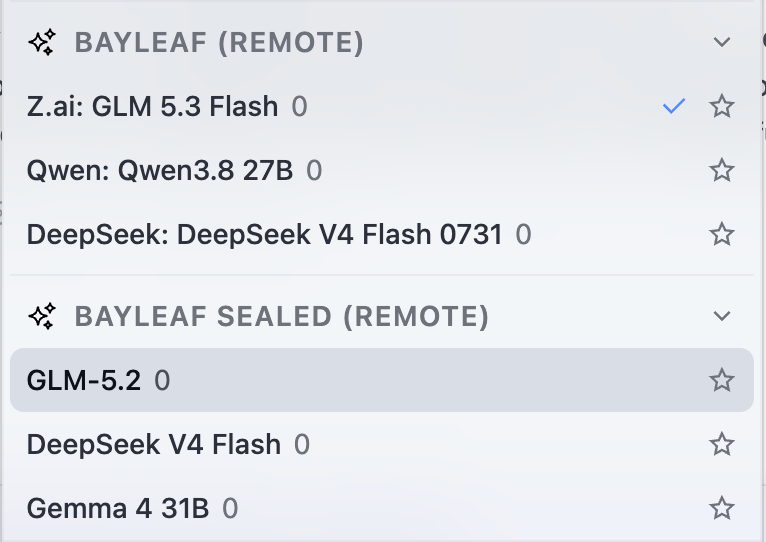
This isn’t IL7, but it is better than you can get in any Education package from a major AI provider.